 Join our Discord
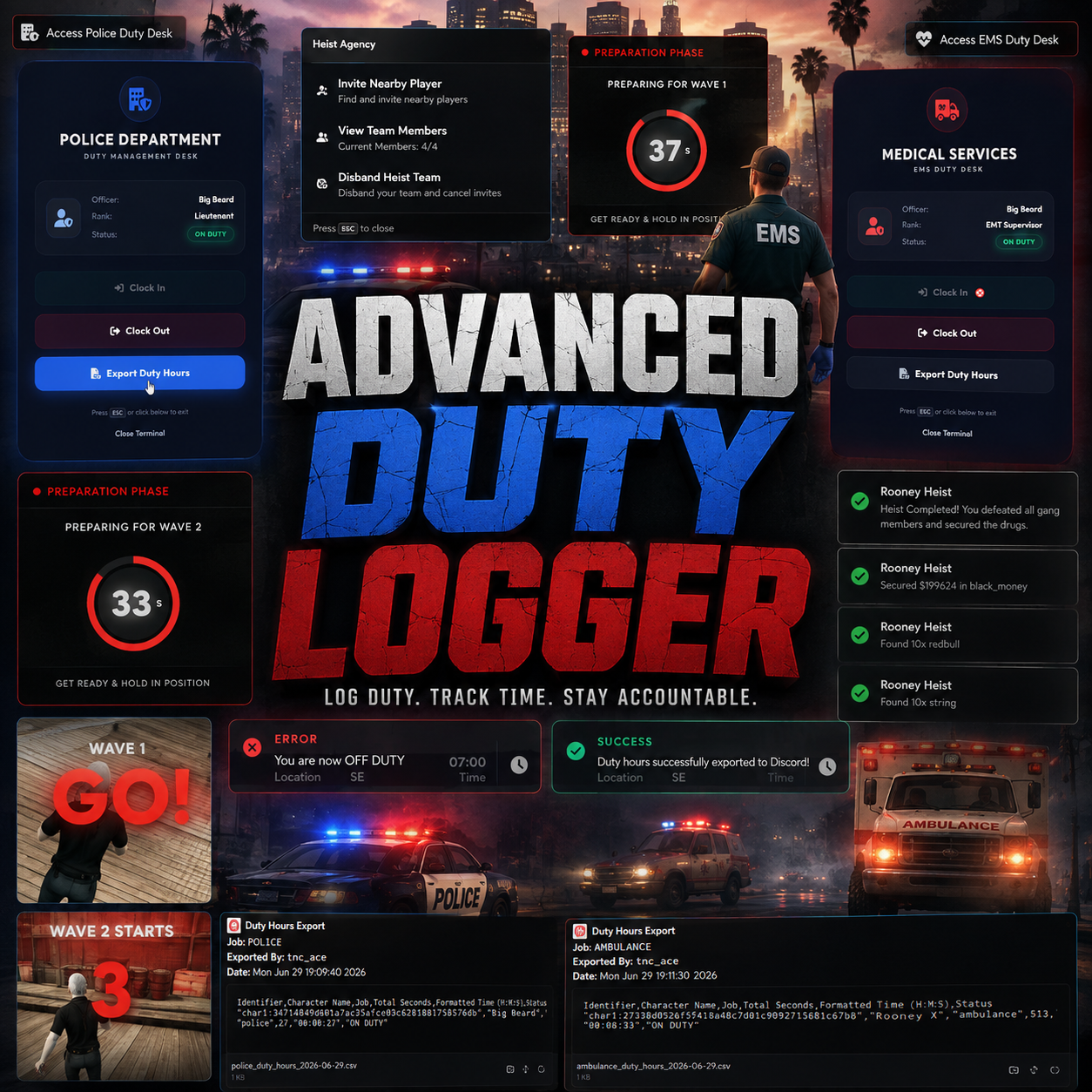
ADVANCED DUTY LOGGER
A professional Police & EMS duty management system designed to bring structured duty tracking, modern interaction, Discord logging, boss management tools and secure server-side validation to your FiveM server.
OVERVIEW
Rooney Advanced Duty Logger is built for servers that want a cleaner and more professional way to manage Police and EMS duty activity.
Instead of relying on basic commands or simple clock-in systems, this resource provides a complete duty workflow with interactive duty stations, automatic clock-in and clock-out tracking, persistent duty time management, Discord logging and boss-level duty hour exports.
The system is designed around performance, reliability and straightforward configuration, making it suitable for both developing communities and larger production FiveM servers.
CORE FEATURES
MODERN GLASSMORPHISM UI
A clean and modern interface designed around the overall duty workflow, keeping interactions simple while maintaining a premium visual presentation.
POLICE & EMS SUPPORT
Designed to support both Police and EMS duty operations with configurable job handling and separate duty logging.
AUTOMATIC DUTY TRACKING
Automatically records clock-in and clock-out activity while tracking the amount of time personnel spend on duty.
BOSS DUTY EXPORT
Authorized department leadership can access duty hour export functionality for monitoring employee activity.
OX_TARGET INTEGRATION
Duty interactions can be handled through ox_target for a clean and intuitive in-world interaction experience.
SECURE VALIDATION
Important duty operations are validated server-side to provide a more reliable and secure gameplay workflow.
DUTY WORKFLOW
Visit the configured duty station.
Begin your official duty session.
Perform your department duties.
End your duty session.
Duty activity is recorded.
DUTY TIME MANAGEMENT
Keep track of how long department personnel remain active on duty. The system provides structured duty session handling instead of relying on manual time calculations.
- Automatic clock-in tracking
- Automatic clock-out tracking
- Duty session duration tracking
- Police duty records
- EMS duty records
- Persistent database integration
- Boss-accessible duty information
DISCORD LOGGING
Keep your staff team informed with configurable Discord webhook logging for important duty activity.
Dedicated Police duty activity logging.
Dedicated EMS duty activity logging.
General duty events can be routed through configurable webhooks.
NOTIFICATION SYSTEMS
Choose the notification provider that best matches your server setup.
CONFIGURATION
The main settings are controlled through config.lua, allowing server owners to adapt the resource to their existing department structure.
SECURITY & SERVER VALIDATION
Duty operations are designed around server-side validation to reduce the possibility of unauthorized client-side manipulation.
- Server-side duty validation
- Controlled duty state handling
- Protected duty operations
- Reliable session tracking
- Secure boss-level functionality
PERFORMANCE
Performance is a core part of the resource design. The system is intended to provide the required functionality without unnecessary client-side overhead.
Designed to remain efficient during normal gameplay.
Avoids unnecessary processing wherever possible.
Suitable for growing roleplay communities.
Built around a practical server-side workflow.
REQUIREMENTS
INSTALLATION
01. Place the resource inside your server's resources directory.
02. Import the included SQL file into your database.
03. Configure your Discord webhook settings.
04. Configure duty stations and supported jobs inside config.lua.
05. Make sure all required dependencies are started first.
06. Add ensure rooney_duty_logger to your server.cfg.
07. Restart your server and begin configuring your duty workflow.
NEED HELP?
For installation assistance, troubleshooting, updates, bug reports and feature requests, join the official Rooney Creations community.
JOIN DISCORDLICENSE & USAGE
This is a premium commercial FiveM resource. Purchasing the resource grants usage rights according to the applicable product/store license.
- No redistribution
- No unauthorized re-selling
- No leaking or public re-uploading
- No sharing of purchased files
- No claiming the resource as your own
- No unauthorized commercial redistribution
PREMIUM FIVE M RESOURCES • PERFORMANCE • MODERN UI • CLEAN DEVELOPMENT